Dask Gateway cluster setup
Initialize gateway object. It will be used to interact with your Dask clusters.
import os
from dask_gateway import Gateway

# To submit jobs via SLURM (Purdue users only!)
gateway = Gateway()

# To submit jobs via Kubernetes (all users)
# gateway = Gateway(
#     "http://dask-gateway-k8s.geddes.rcac.purdue.edu/",
#     proxy_address="traefik-dask-gateway-k8s.cms.geddes.rcac.purdue.edu:8786",
# )
Create a new cluster.
# You may need to update some environment variables before creating a cluster.
# For example:
os.environ["X509_USER_PROXY"] = "/path-to-voms-proxy/"

# Create the cluster
cluster = gateway.new_cluster(
conda_env = "/depot/cms/kernels/python3", # path to conda env
worker_cores = 1,    # cores per worker
worker_memory = 4,   # memory per worker in GB
env = dict(os.environ), # pass environment as a dictionary
)

cluster
This is how the widget for Dask Gateway cluster will look like, if it gets created successfully:
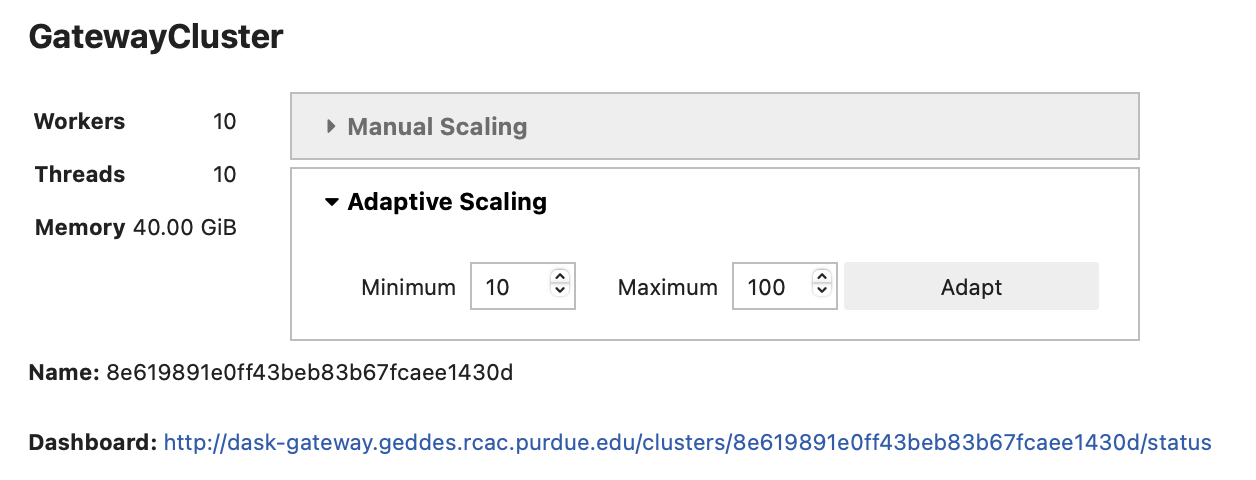
- Use adaptive (recommended) or manual scaling to create Dask workers.
- Click on the dashboard link to open the Dask dashboard
- To access worker logs, click on "Info" tab in the Dask dashboard
Check if you already have clusters running:
Shut down cluster.
cluster.shutdown()

# Or shut down a specific cluster by name:
# cluster_name = "b2aec555e2f844d68a5febd6c5d1414e"   # paste cluster name here
# client = gateway.connect(cluster_name).shutdown()
Shut down all clusters: